


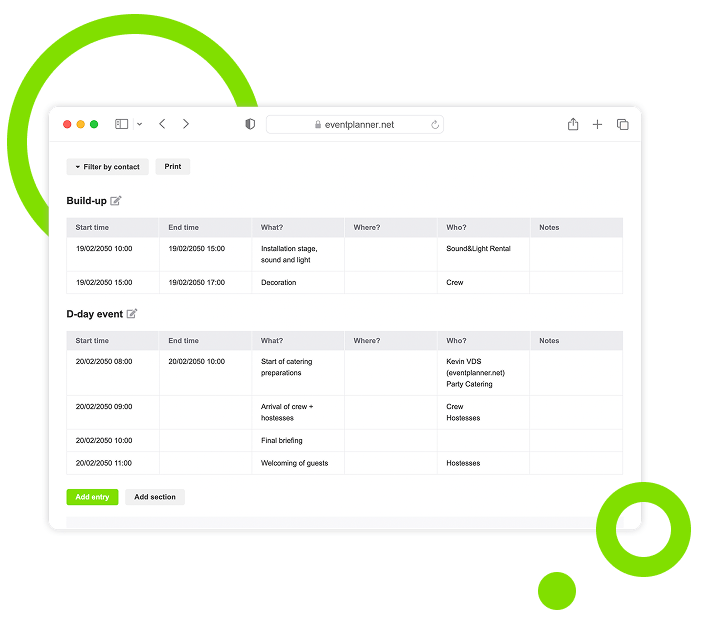
Manage Day-of-Event Activities with Call Sheets
Break event execution into minute-by-minute schedules for flawless coordination. Align your team with detailed plans for the event build-up and wrap-up.
Trusted by 179.000+ Event Organisers












Turn Team Tasks Into Clear Actions for Event Day
Stop stressing over miscommunication or missed cues during the event. Organise time blocks, assign staff roles, and deliver a well-coordinated show flow.
Keep Your Event on Schedule
- Prevent delays with precise task timing.
- Reduce stress with a well-organised timeline.
- Gain confidence knowing everyone is aligned.
Simplify Event Task Management
- Break complex workflows into manageable sections.
- Focus on what matters for each stage of your event.
- Navigate schedules with intuitive organisation.
Guide Your Team with Clear Direction
- Access personalised task list via app for fast action.
- Ensure offline readiness with printable schedules.
- Eliminate confusion with precise communication.
Gain Control Over Access and Visibility
- Share specific schedules with the right team members.
- Protect sensitive details with permission settings.
- Track accountability with role-specific assignments.
Discover Your Event Planning Toolkit
Learn how event call sheets integrate with other planning features within our event software.
Moodboards
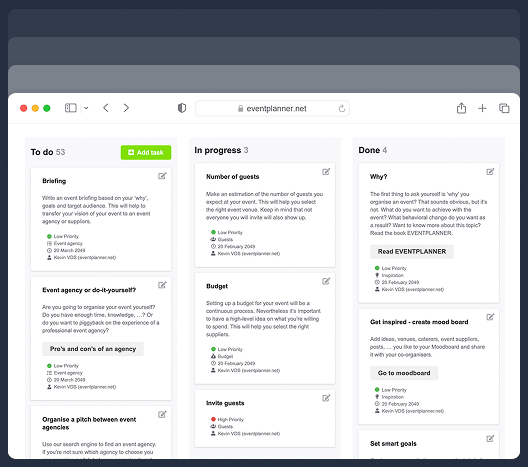
Capture ideas, curate inspiration, and explore vendors to shape your event's vision, theme, and personality.
Checklists
Keep track of every planning detail. Create and assign tasks to your team members, and never miss a deadline.
Budgets
Manage your event budget and expenses. Get a complete overview of fund allocation and track your spending.
Ticketing
Generate event tickets and manage on-site registration. Create easy check-in experiences for your attendees.
Event Timeline Setup
Configure detailed schedules and task assignments to organise your event-day flow.
Specify Task Timing
Define exact time windows and deadlines for each activity to maintain schedule control.
-
Add start dates and times for precise scheduling.
-
Set duration limits to prevent task overlap.
-
Configure deadlines to manage the event timeline.
-
Reconfigure task sequences for better flow.
Define Task Details
Include core task information and specifications for clear team communication.
-
Enter task descriptions to highlight requirements.
-
Specify locations for efficient venue navigation.
-
Assign team members for clear ownership.
-
Set status indicators for progress tracking.
Event Stage Coordination
Break down event schedules into manageable stages to simplify task execution and timing.
Structure Task Sections
Organise your team’s activity timeline into task-specific sections to cover every stage of the event.
-
Create and label sections to segment event stages.
-
Arrange sections in chronological order.
-
Filter tasks by team member to track progress.
-
Change or remove sections when plans change.
Manage Task Organisation
Arrange tasks within specific sections to maintain a structured event schedule.
-
Group tasks under the right sections for clarity.
-
Reorder tasks to match priorities and timeline.
-
View a summary of tasks in each section.
-
Mark tasks as complete to update progress.
Event-day Tasks Management
Download our app for real-time coordination or/and prepare offline-ready documents
Manage Onsite Tasks Via App
Access your tasks before, during, and after the event directly in the app.
-
Receive instant updates and adapt to changes.
-
Track task progress with live follow-ups.
-
Access personalised tasks for precise coordination
-
View tasks in sections for organised execution.
Generate Physical Documents
Create printable versions of event schedules for offline use and team reference.
-
Print schedules to share with everyone involved.
-
Generate task lists by role for quick distribution.
-
Include status details for meeting preparation.
-
Produce copies as backups for reliability.
Team Roles and Responsabilities
Set up role-based permissions and task visibility to enable team coordination and accountability.
Handle Task Assignment
Define task ownership and assign granular responsibilities across your event schedule.
-
Designate primary task owners for ultimate authority.
-
Add supporting team members to balance workloads.
-
Create vendor contacts for external task delegation.
-
Monitor task distribution to identify bottlenecks.
Oversee Access Rights
Configure viewing permissions and information sharing to maintain security of event data.
-
Set task visibility for targeted distribution.
-
Assign role-based access levels for standardised control
-
Track sensitive information flow for data protection
-
Monitor team permissions for access compliance
Event Call Sheets, a Tool for Coordination and Execution
Set the foundation for your event day(s) with schedules that work for your team and vendors. Turn your task list into minute-by-minute actions for timely execution.
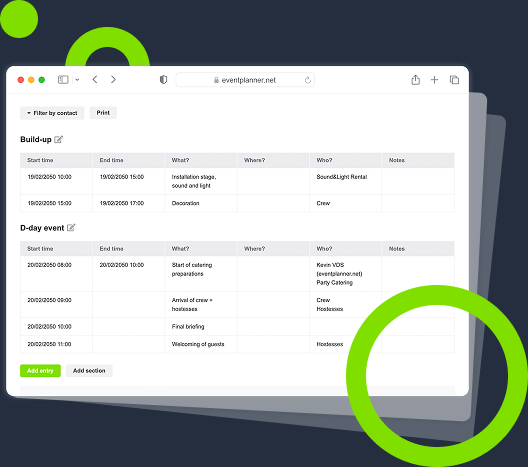
Visualise Actions, Direct Execution
Track your entire event timeline, team assignments, and progress updates from a single command center.
Unite Teams and Vendors, Maintain Alignment
Unite your staff and vendors under one system. Everyone knows their role throughout the event.
Coordinate Timelines, Drive Action
Direct your event with precision. Every task owner receives clear instructions exactly when needed.
Update Plans, Preserve Flow
Adjust your plans instantly as circumstances change. Keep your event flowing with real-time schedule updates.
Frequently Asked Questions
-
Can I use call sheets for multi-day events?
Absolutely. You can create separate sections for each event day or maintain a continuous timeline. The system helps you organise tasks across multiple days while keeping them connected within the same event schedule.
-
Is there a mobile version for on-the-go updates?
Yes. Team members can access their call sheets through mobile devices. This makes it easy to view assignments and update task status while moving around the venue. You can download our app from the Apple App Store or Google Play Store.
-
How do I share specific tasks with team members?
You control what each person sees. Give team members access to all tasks or just their own assignments. Filter and print task lists for specific people.
-
Can I add external vendors to my event call sheets?
Yes. You can add vendors as external contacts and assign them specific tasks. They'll receive access to only their relevant sections of the call sheet. This will help maintain security while providing them the information needed for their role in the event.
-
Can I use the event call sheet offline?
Yes. Print your complete call sheet or filtered versions showing specific sections or team member tasks. Always have a backup copy ready.
-
What happens if I need to make last-minute changes?
You can update the call sheet in real-time, and all team members will instantly see the changes on their devices. For those using printed versions, you can quickly generate and distribute updated copies.
-
How do I track task completion?
Mark tasks as done using the checkbox next to each item. Track completion across sections and team members to monitor progress.
-
Can I reuse call sheets from previous events?
Yes. You can save call sheets as templates for future use. This is particularly useful for recurring events or similar event types, allowing you to maintain consistency while saving setup time.
free forever
Perfect for professionals and smaller event planning teams managing one event at a time.
from per seat/month
Great for professionals and larger teams managing multiple events at a time.
from per month
Perfect for organisations requiring custom solutions, advanced security, and dedicated support
Event Planning Software That Grows With You
Select a plan that matches your ambitions, whether you're managing a single event or running multiple projects simultaneously.