

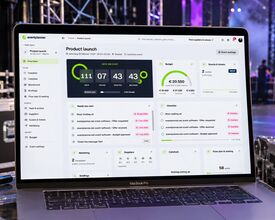
Our event software has a brand-new look and is easier to work with, too. We call this release Midori, after the bright green cocktail. Green has always been our colour, so the name picked itself.
What you see today is the first step. We started with the parts you use every day: finding your way around, your list of events, your checklists and a brand new dashboard for every event.
What's new
- Navigation that keeps you on track. A clear new menu puts everything within reach. Inside an event, that menu shows the event's own tools, and a switcher takes you to another event in one click. Need more room? Fold the menu down to icons.
- All your events at a glance. When you log in, you land straight on your events. Switch between upcoming, past and archived events, and view them as a list or as cards.
- A dashboard for every event. Each event now opens on its own overview. A live countdown shows how long you have until the doors open, and a progress bar tells you whether you're on track, at risk or behind plan, based on your task deadlines. Under "Needs you next" you find what is waiting for you: your late or urgent tasks, team members who haven't accepted their invitation yet and unread replies from suppliers. Next to it, one tile per tool shows the latest from your checklist, budget, guests and tickets, callsheet, seating plan, suppliers and briefings.
- Checklists that move with you. Your tasks sit on a board in To do, In progress and Done, and you drag a card to move it. Search and filters help you find the right tasks in seconds. The perfect project management tool for your event, integrated with the eventplanner.net platform.
- Help right where you need it. Each tool has a help button at the top of the page, so an explanation is never more than a click away.
Easier to work with
A fresh look was only half of the goal. The other half was making your daily work take fewer clicks and less searching. What needs your attention comes to you, gathered on one page. And everything works the same way on your laptop, your tablet, your phone and in our app.
What's next
Midori arrives tool by tool. In the coming weeks Budgets, Callsheets, Tickets, Event Diagramming and the other tools of our event software get the same upgrade. They will look and work alike, and they will be more closely connected, so what happens in one tool shows up where you need it in another.
A new manual
A new interface deserves a new manual, so we are rewriting ours. Every guide gets screenshots of the new screens and clear, step-by-step explanations. The first guides have already been updated, and the others will follow as each tool gets its Midori upgrade.
Take a look
Log in to your event software and see Midori for yourself. We would love to hear what you think, so send us a message through the chat in the event software. Your feedback helps shape the next steps.